Slider-1-Title-Here

Lorem ipsum dolor sit amet, consectetuer adipiscing elit. Aenean commodo ligula eget dolor. Aenean massa. Cum sociis natoque penatibus et magnis dis parturient montes, nascetur ridiculus mus. Donec quam felis, ultricies nec, pellentesque eu, pretium quis, sem. Nulla consequat massa quis enim.

Slider-2-Title-Here

In enim justo, rhoncus ut, imperdiet a, venenatis vitae, justo. Nullam dictum felis eu pede mollis pretium. Integer tincidunt. Cras dapibus. Vivamus elementum semper nisi. Aenean vulputate eleifend tellus. Aenean leo ligula, porttitor eu, consequat vitae, eleifend ac, enim. Aliquam lorem ante, dapibus in, viverra quis, feugiat a, tellus. Phasellus viverra nulla ut metus varius laoreet.

Slider-3-Title-Here

Aenean imperdiet. Etiam ultricies nisi vel augue. Curabitur ullamcorper ultricies nisi. Nam eget dui. Etiam rhoncus. Maecenas tempus, tellus eget condimentum rhoncus, sem quam semper libero, sit amet adipiscing sem neque sed ipsum. Nam quam nunc, blandit vel, luctus pulvinar, hendrerit id, lorem.

Slider-4-Title-Here

dui quis mi consectetuer lacinia. Nam pretium turpis et arcu. Duis arcu tortor, suscipit eget, imperdiet nec, imperdiet iaculis, ipsum. Sed aliquam ultrices mauris. Integer ante arcu, accumsan a, consectetuer eget, posuere ut, mauris. Praesent adipiscing. Phasellus ullamcorper ipsum rutrum nunc. Nunc nonummy metus. Vestibulum volutpat pretium libero. Cras id dui.

Slider-5-Title-Here

Aenean tellus metus, bibendum sed, posuere ac, mattis non, nunc. Vestibulum fringilla pede sit amet augue. In turpis. Pellentesque posuere. Praesent turpis. Aenean posuere, tortor sed cursus feugiat, nunc augue blandit nunc, eu sollicitudin urna dolor sagittis lacus.

Lokasi Gempa

Gambar ini menunjukkan lokasi gempa terakhir di Indonesia

This is default featured slide 2 title

Go to Blogger edit html and find these sentences.Now replace these sentences with your own descriptions.This theme is Bloggerized by Lasantha Bandara - Premiumbloggertemplates.com.

Compass

Penunjuk Arah

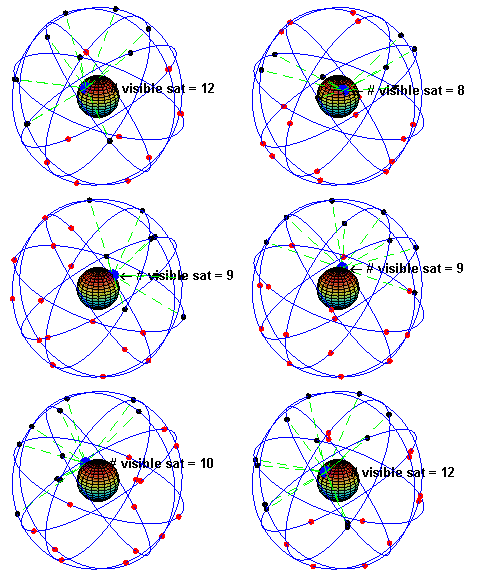
GPS Constellation

A visual example of the GPS constellation in motion with the Earth rotating. Notice how the number of satellites in view from a given point on the Earth's surface, in this example at 45°N, changes with time.

This is default featured slide 5 title

Go to Blogger edit html and find these sentences.Now replace these sentences with your own descriptions.This theme is Bloggerized by Lasantha Bandara - Premiumbloggertemplates.com.

Showing posts with label ArcView. Show all posts

16.12.09

Buku: SIG & Wisata Bahari

Sistem Informasi Geografi (SIG) bukanlah teknologi baru dalam dunia ilmu komputer. Keandalannya dalam menganalisis suatu masalah secara spasial telah menarik minat sebagian besar orang untuk mengimplementasikan teknologi ini dalam berbagai bidang.

Buku ini hadir untuk memberikan pemahaman konsep dan imlplementasi SIG secara sederhana dengan mengambil contoh kasus perencanaan wisata bahari menggunakan aplikasi ArcView 3.2 dan ERMapper 6.4. Arcview 3.2 sengaja digunakan dalam buku ini karena kemudahannya dan banyak dipakai diberbagai instansi dan perguruan tinggi. Sedangkan ERMapper 6.4 adalah aplikasi pengolah citra yang cukup mudah digunakan dan belum banyak orang memanfaatkan kecanggihan aplikasi ini.

Salah satu kelebihan buku ini adalah dapat menjelaskan bagaimana mengolah citra dalam ERMapper 6.4 lalu mengkombinasikan citra hasil olahan tersebut dengan peta-peta rupa bumi di dalam ArcView 3.2. Langkah demi langkah dapat diikuti dengan mudah sehingga pembaca atau pengguna SIG dapat memahami cara-cara mengolah citra dan menganalisis data spasial dari berbagai sumber.

Pembahasan yang sederhana pada setiap bab dalam buku ini akan memudahkan para pembaca memahami konsep dan implementasi SIG. Oleh karena itu, bagi anda yang ingin mempelajari dan mengembangkan SIG untuk memecahkan suatu masalah secara spasial, buku ini sangat layak dijadikan pegangan sekaligus memperkaya khasanah pengetahuan Anda di bidang SIG. (Diambil dari teks Kover belakang buku)

Judul Buku: Sistem Informasi Geografi - menggunakan aplikasi ArcView 3.2
Penulis: Muhamad Jafar Elly
Penerbit: Graha Ilmu Yogyakarta
Cetakan: Pertama, 2009. Edisi Pertama
VIII + 142 hlm,; 23 cm
ISBN 978-979-756-497-1
harga: Rp 34.800 (15 Desember 2009; Toko Buku Gramedia Blok M)

5.12.09

ToT Risk Mapping/PGIS for DM: Arcview

Selain menggunakan MapSource, kali ini untuk mengolah database kami menggunakan Arcview.

Setelah data didapat dengan menggunakan GPS (Garmin ETrex Vista HCx, Cx, Vista dan Legend) dengan bantuan DNR Garmin kami olah dalam ArcView.

Dalam sesi ini, dipelajari bagaimana membuat poligon, line dan database untuk sistem informasi geografisnya.


Silahkan tulis komentar disini. ▲

24.4.09

Disaster Preparedness Exercise Uses GIS


Unfortunately, disasters happen. They can be limited in scope or reach catastrophic proportions. They can hit rural, isolated areas as well as sweep through multiple jurisdictions, affecting lives, property, and the environment. To prepare for these events, communities hold emergency preparedness exercises. An emergency preparedness exercise is a simulation of an event, or series of events, designed to test emergency response systems. Communications, technology, existing resources, knowledge, and skills are tested to see if the systems work. Hopefully, the systems will work flawlessly, but sometimes investments need to be made for improvements. In the end, an exercise gives valuable information that can be used to enhance emergency services.


Being prepared to respond to and recover from emergencies is a big responsibility and a continual challenge. Montana's Department of Public Health and Human Services (DPHHS) did just that when it participated in a four-day statewide disaster preparedness exercise known as Operation Last Chance One last year.


Designed to challenge emergency managers and test emergency response systems, the exercise improved disaster and emergency response in Montana. The exercise included participation from 59 of the 63 county and tribal health departments in Montana, as well as 26 hospitals and clinics. The first of the two-part exercise simulated the spread of pneumonic plague as high school campers returned home, as well as a chemical release from an airplane that crashed at Helena Regional Airport. Operation Last Chance One tested the ability of state and local health departments and their response partners to effectively coordinate and communicate during an emergency response. More than 500 emergency personnel and volunteers from more than 100 agencies and organizations participated in the exercise.


One focus area of the exercise was information technology (IT)—how IT could be effectively used in the analysis and dissemination of information and how this information could assist in the event of a real emergency. The exercise was open to a few private technology companies; ESRI and ESRI Business Partner GCS Research were invited to participate.


Volunteering in support of the DPHHS Emergency Operations Center (EOC) planning team, operating under the incident commander, the companies used ArcGIS Desktop (ArcView) software and ArcWeb Services. Exercise officials were then able to import, visualize, analyze, and create on-the-fly maps for communication and decision-making purposes, tracking the spread of disease over time. The DPHHS GIS team also exchanged information in real time with the Montana Disaster and Emergency Services GIS team to ensure that a common operational picture was established and shared by the participating agencies for disease surveillance, communication, and decision making.


ArcView, along with the ArcGIS 3D Analyst, ArcGIS Network Analyst, and ArcGIS Spatial Analyst extensions, was used to demonstrate how existing geographic datasets and near real-time information—including hospital capacity, live weather, and traffic—could be displayed. This data was used from Web services and other distributed data sources and easily integrated within the ESRI software framework.


"GIS can be very useful in situations that require us to have a better integrated view of conditions on the ground," says Jim Aspevig, public health informatics manager, DPHHS.


GCS Research demonstrated the value of GIS during the first scenario, a plane crash that included a chemical release of a suspicious white powder. ArcView and ArcGIS Spatial Analyst were used to show plume modeling, and ArcGIS Network Analyst was used to show optimized routing and distribution of the strategic national stockpile, mapping of resources for incident response, and demographic analysis for determining affected populations.


The second scenario tracked a bubonic plague outbreak at a fictitious high school camp. ArcView and ArcGIS Spatial Analyst were used to trace the children from the camp back to their home counties in Montana, aggregate the data quickly, and analyze the potential spread of the disease.


The GIS Team engaged with the Planning Team and epidemiologists from the Operations Team to compare and contrast the results of epidemiological models against simulated real-world reports of suspected and confirmed pneumonic plague cases from around the state; also to investigate ways to improve the accuracy of spatiotemporal models in addressing the rural nature of Montana's geography.


"In my opinion, the usefulness of graphic visualization made possible by GIS cannot be overstated," says Earl Hall, basic biodefense project manager at the University of Montana. "While the data necessary for a robust GIS application to public health emergencies in Montana may still be in its infancy, I am convinced that a commitment to data integration will ultimately prove beneficial to public health authorities. Predictive modeling of infectious disease spread, using GIS technology, is an area that deserves more attention."


A crucial element of Operation Last Chance One was to test the ability of local, state, and federal health officials to share information and resources during a disaster response. Another goal was to test the ability of public health agencies to diagnose diseases and investigate and control their spread.


"Working closely with the EOC Planning Team provided a real-world opportunity to demonstrate the value of GIS during an emergent public health crisis," says Dr. Alex Philp, president, GCS Research. "The value of a geospatial common operational picture was clearly demonstrated and we look forward to assisting DPHHS in substantiating the lessons learned during the training exercise."


Says Bill Davenhall, health and human services industry manager, ESRI: "GIS adds value to IT infrastructure by providing a framework to integrate data from disparate sources—event data; critical infrastructure data, such as hospitals, clinics, schools, and roads; pharmaceutical stockpile sites; political boundaries; and real-time data feeds, such as weather, traffic, and emergency room visits—then visualize, analyze, and map that information in order to create a common operational picture for communication and decision-making purposes."


For more information, contact Jim Aspevig, public health informatics manager, Montana Department of Public Health and Human Services (e-mail: jaspevig@mt.gov).


From: http://www.esri.com/news/arcnews/spring06articles/disaster-preparedness.html

28.8.08

Menggunakan DNR Garmin untuk GPS Garmin (Using DNR Garmin for download data from GPS Garmin)

Bila kita menggunakan piranti lunak ArcView versi 3.x. kita bisa menggunakan piranti lunak DNR Garmin untuk melakukan transfer data dari (dan ke) alat penerima GPS Garmin ke ArcView. DNR garmin ini difungsikan sebagai interface yang diimplementasikan sebagai extension. DNR Garmin dapat diaktifkan secara mandiri tanpa harus mengaktifkan aplikasi ArcView.


Pengembangan extension ini memungkinkan kita bisa:


1. Mengunduh tracks dan waypoints dari GPS Garmin yang kita gunakan.


2. Mengkonversi tracks ke dalam bentuk points, lines, atau bahkan polygon.


3. Mengkonversikan waypoints ke shapefiles tipe titik atau file teks ascii.


4. Mengkonversikan unsur-unsur spasial ke dalam format titik-titik GPS atau track.


5. Mengunduh informasi titik-titik GPS serta tracks ke dalam GPS Garmin yang terhubung.


Berikut cara mengeksport data ke format “.SHP”, “.SHX”, dan ”.DBF”:


1. Hubungkan GPS ke PC


2. Aktifkan GPS


3. Buka DNR Garmin dari komputer anda (semoga anda sudah menginstalasi DNR Garmin).


4. Klik pilihan yang sesuai, misalnya anda ingin mengunduh waypoint maka klik waypoint, dilanjutkan dengan mengklik Download


5. Keluar kotak dialog yang memperlihatkan proses pengunduhan


6. Proses unduh selesai, klik OK


Bila kita menggunaan Garmin Etrex Vista Cx, biasa akan timbul kotak dialog yang menyatakan proses transfer tidak bisa dilakukan karena DNR Garmin tidak menemukan port yang cocok maka langkah berikut harus dilakukan:


1. Biasanya timbul kotak dialog berikut


Klik OK


2. Klik GPS, pindahkan kursor ke Set Port, kemudian klik USB


3. DNR Garmin telah mengenali GPS kita dan siap digunakan


Silahkan mengunduh data GPS.


Akhir dari tulisan ini

Another Articles

Ready to Download

Silahkan Unduh Manual dibawah ini, bila dijadikan referensi mohon dicantumkan sumbernya.

Manual Mahir Memanfaatkan Peta Navigasi.net untuk Garmin Map 76 CSx, ETrex Vista HCx dan Nuvi Series dalam 30 Menit

Manual singkat yang berisikan langkah-langkah Instalasi dan memanfaatkan peta navigasi.net untuk GPS Garmin Map 76 CSx, ETrex Vista HCx dan Nuvi Series


Manual Mahir Garmin Map 76 CSx dalam 30 Menit

Manual singkat yang berisikan langkah-langkah penggunaan GPS Garmin Map 76 CSx


Manual Garmin HCx untuk Pemetaan Risiko Bencana

Manual yang berisikan langkah-langkah penggunaan GPS Garmin HCx untuk memetakan risiko bencana, dan juga berisi bagaimana mengolah data di MapSource setelah mendapatkan data GPS


Daftar Legenda dalam Pemetaan Risiko Bencana

Berisikan legenda-legenda yang ada dalam manual SIGaP untuk Pemetaan Risiko digunakan dalam memetakan risiko bencana


Daftar Kebutuhan Pemetaan Risiko Bencana

Daftar yang berisikan keperluan-keperluan pemetaan risiko bencana yang biasa digunakan oleh PMI


Daftar Istilah dalam Pemetaan Risiko Bencana

Berisikan istilah-istilah yang ada dalam manual SIGaP untuk Pemetaan Risiko digunakan dalam memetakan risiko bencana


Kamus SIGaP/ Dictionary of PGIS

Berisikan istilah-istilah yang digunakan dalam Sistem Informasi Geografis Partisipatif, keluaran PPGIS/IAPAD


Diagram Alur Pemetaan Risiko Bencana

Diagram alur pemetaan risiko bencana yang biasa digunakan oleh PMI


Formulir Hazard

Formulir Hazard/Ancaman yang biasa digunakan oleh PMI


Formulir Isian

Formulir Isian dalam pemetaan risiko yang biasa digunakan oleh PMI


Daftar di bawah ini merupakan Bab-bab yang ada dalam Buku Manual Sistem Informasi Geografis Partisipatif (SIGaP): Pemetaan Risiko yang dilakukan secara Partisipatif

Bab 2: GPS

Bab 2 dari buku Manual SIGaP untuk Pemetaan Risiko, yang merupakan buku pertama dalam rangkaian buku Pemetaan Risiko. Berisikan dasar-dasar GPS dan hubungannya dengan Risiko Bencana


Bab 4: Analisa Data

Bab 4 dari buku Manual SIGaP untuk Pemetaan Risiko, yang merupakan buku pertama dalam rangkaian buku Pemetaan Risiko. Berisikan bagaimana menganalisa data yang sudah didapat dalam pemetaan di lapangan oleh Sukarelawan PMI


Bab 5: Membuat Peta Tumpang Susun/Overlay, Peta Dinding, dan 3 Dimensi

Bab 5 dari buku Manual SIGaP untuk Pemetaan Risiko, yang merupakan buku pertama dalam rangkaian buku Pemetaan Risiko. Berisikan bagaimana membuat peta tumpang susun, peta dinding, dan peta 3 Dimensi. Langkah ini merupakan langkah berikutnya setelah pengolahan data dengan MapSource


Bab 6: Google Earth

Bab 6 dari buku Manual SIGaP untuk Pemetaan Risiko, yang merupakan buku pertama dalam rangkaian buku Pemetaan Risiko. Berisikan dasar-dasar pemanfaatan Google Earth dalam pemetaan Risiko

Ready Downloaded List: Mapping Software

Download Google Earth
Google Earth Versi 6.2

Unggah Google Earth versi terbaru


Download MapSource Mutakhir MapSource software version 6.16.3

Tingkatkan MapSource anda dengan piranti lunak MapSource terbaru dari sumber aslinya


Up Date software unit Garmin Anda Up Date Software Garmin Anda

Tingkatkan Performa GPS Receiver Garmin anda dengan piranti lunak dari sumber aslinya

Reader